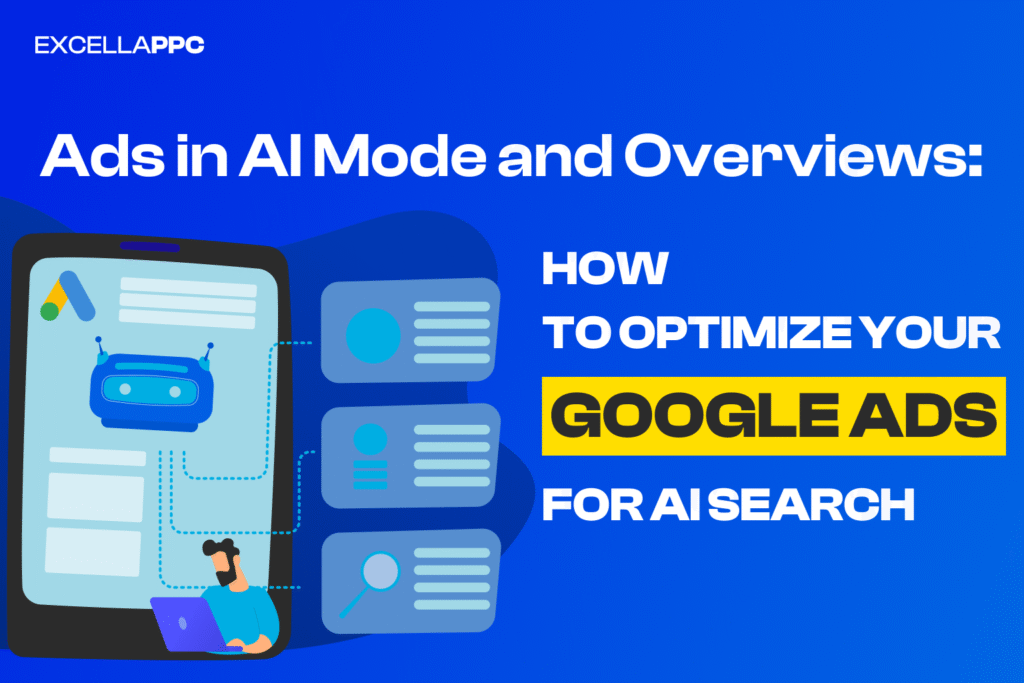
Advertising in Google’s AI Search: How to Appear in AI Mode and Overviews
Retail innovation is accelerating faster than ever, and one of the biggest shifts we’re seeing today is the rise of agentic commerce – a model where AI can complete tasks on behalf of shoppers. What once sounded futuristic is quickly becoming reality. Google is actively investing in this future, with a focus on building an open and collaborative ecosystem that benefits retailers, platforms, and consumers alike.
What is Agentic Commerce?
Agentic commerce refers to AI-powered systems that can help users discover products, compare options, and even complete purchases automatically. Instead of jumping between websites, shoppers can interact with AI agents that handle much of the buying process for them – saving time and reducing friction.
Introducing the Universal Commerce Protocol (UCP)
Google recently launched the Universal Commerce Protocol (UCP) – an open standard created specifically for agentic commerce. UCP is designed to work across the entire shopping journey, from product discovery and checkout to post-purchase support.
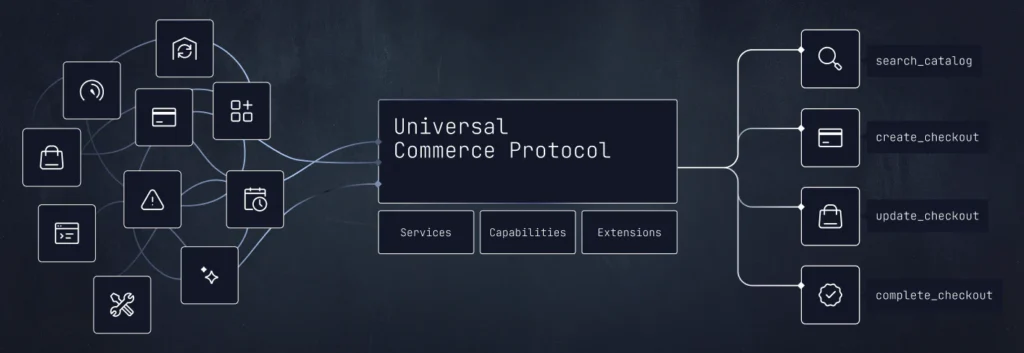
At its core, UCP establishes a shared “language” that allows AI agents, merchant systems, and payment providers to communicate smoothly across different platforms. This makes it possible for commerce to happen directly inside AI-powered experiences. With UCP, shoppers can apply discount codes, use loyalty rewards, choose subscriptions, and complete different types of checkout flows – all within a chat-based interface.
Built With the Industry, for the Industry
UCP wasn’t developed in isolation. Google partnered with leading retailers and platforms such as Shopify, Etsy, Wayfair, Target, and Walmart, alongside more than 20 other ecosystem partners including Stripe, Mastercard, Visa, American Express, The Home Depot, and Zalando. This broad collaboration helps ensure the standard works across real-world retail environments and scales effectively.
How UCP Will Work in Practice
The first major use of UCP will appear in Google Search AI Mode and the Gemini app. Eligible product listings will soon offer a built-in checkout option, allowing U.S. shoppers to complete purchases directly while researching products on Google.
Security is a core focus of this experience. Shoppers will be able to check out using Google Pay, with payment methods and shipping details securely stored in Google Wallet. Support for PayPal is also coming soon. Importantly, retailers remain the seller of record and can customize how UCP integrates with their existing systems – helping increase conversions while reducing cart abandonment.
Optimizing for the Era of Conversational Commerce
The way people shop online is evolving rapidly, but the core objective remains unchanged: helping retailers get discovered at the right moment. As conversational commerce grows, Google is adapting how products appear across AI-powered experiences such as AI Mode, Gemini, and Business Agent.
To support this shift, Google has introduced a range of new data attributes in Google Merchant Center designed specifically for discovery in conversational environments. These attributes enhance existing product feeds and move beyond traditional keyword-based data. Retailers can now provide richer information, including answers to common product questions, compatible accessories, and alternative product suggestions. This additional context helps AI systems better understand products and match them to user intent. Google plans to roll out these features initially with a small group of retailers, with broader availability expected in the coming months.
What Is AI Mode in Google Search?
AI Mode in Google Search is an AI-powered search experience that allows users to interact with Google in a more conversational way. Instead of showing only a traditional list of links, AI Mode uses generative AI to understand complex queries, combine information from multiple sources, and deliver clear, contextual answers directly within the search interface. Users can ask follow-up questions, refine their intent, and explore products or topics more naturally, similar to a chat experience. For businesses and advertisers, AI Mode represents a shift toward intent-driven discovery, where visibility depends not just on keywords, but on how well content, products, and offers align with real user needs at the moment of search.
Introducing Direct Offers in AI Mode
As more shoppers rely on AI to research and compare products, retailers need more effective ways to stand out and deliver value. In response, Google is continuing to test ads within AI Mode and has introduced a new pilot feature called Direct Offers.
Direct Offers allow advertisers to showcase exclusive promotions – such as a limited-time 20% discount – directly within AI-driven search experiences. These offers appear when shoppers are close to making a purchase decision, helping bridge the gap between product discovery and conversion.
Here’s how it works in practice: imagine searching for “a modern, stylish rug for a high-traffic dining room that’s easy to clean.” Google’s AI already surfaces products that match these requirements. Now, with Direct Offers, eligible retailers can also highlight a special deal alongside their products. This gives shoppers added incentive to buy while helping retailers increase conversions at the exact moment purchase intent is highest.
It enhances your existing strategy: Direct Offers seamlessly complements Performance Max and Standard Shopping campaigns, appearing in specific product views to generate incremental conversions.
It responds to real-time shopper intent: There’s no need to rely on static, rules-based discounts. Google’s AI determines the optimal moment to show an offer based on user intent and market signals, helping convert high-intent shoppers at the right time.
You stay in full control: The AI never creates offers on its own. All promotions are pulled directly from your verified Merchant Center feed and the exact promo codes you provide.
Connect With Customers Through a Branded AI Agent
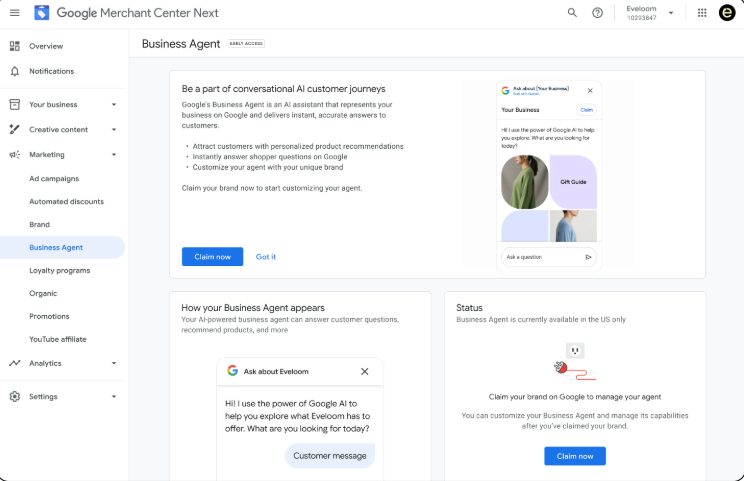
Google has also introduced Business Agent, a new way for shoppers to engage directly with brands within Google Search. Think of it as a virtual sales associate that can answer product-related questions in your brand’s voice. By enabling real-time, conversational interactions, Business Agent helps retailers connect with potential customers at key decision-making moments and guide them closer to a purchase.
This new experience represents the next evolution of brand-to-consumer communication and is currently rolling out in the U.S. Business Agent is built to support deeper customer relationships through advanced customization and tighter data integration.
The agent pulls information directly from your website, allowing it to provide accurate, brand-specific answers. When combined with your Merchant Center data, Business Agent can deliver richer product insights, making customer interactions more helpful, relevant, and conversion-focused.
What’s Next for AI-Powered Commerce?
Google plans to expand UCP globally in the coming months while adding new capabilities such as related product discovery, loyalty reward integration, and customized AI-driven shopping experiences. As agentic commerce continues to evolve, open standards like UCP are likely to play a critical role in shaping how consumers shop – and how brands stay competitive in an AI-first world.
Google’s AI Overviews are changing how users interact with search results. Instead of only showing traditional blue links, Google now uses artificial intelligence to generate summarized answers at the top of the page. For advertisers and marketers, this raises an important question: how can your ads and content appear in Google’s AI Overviews?
In this article, we’ll explain how Google AI Overviews work and what you can do to improve your visibility and ad performance in this new search environment.
What Are Google AI Overviews?
Google AI Overviews (formerly part of the Search Generative Experience) are AI-generated summaries that appear above organic search results for certain queries. They combine information from multiple trusted sources to answer user questions quickly.
While ads are not directly embedded inside AI Overviews yet, Google still displays Search ads, Shopping ads, and Performance Max campaigns around and alongside these results. This means your ads can still capture high-intent traffic if they are optimized correctly.
Can Ads Appear in Google AI Overviews?
At the moment, Google does not allow traditional ads inside the AI Overview text itself. However, ads can appear:
- Above the AI Overview
- Below the AI Overview
- On the same search results page for AI-triggered queries
This makes visibility, relevance, and intent matching more important than ever.
How to Optimize Ads for AI Overview Search Results
1. Focus on High-Intent, Question-Based Keywords
AI Overviews are most often triggered by informational and problem-solving queries, such as:
- “How does…”
- “Best way to…”
- “What is the difference between…”
Popular keywords to target include:
- Google AI Overviews
- AI search optimization
- Google SGE ads (Search Generative Experience ads)
- AI search advertising
- how to optimize for Google AI
Use these keywords in Search campaigns, especially with phrase and broad match combined with smart bidding.
2. Use Performance Max and Search Together
Google increasingly favors Performance Max campaigns for AI-driven placements. To increase your chances:
- Run Search + Performance Max simultaneously
- Use strong conversion signals
- Optimize product feeds and landing pages
Performance Max helps Google understand where your ads should appear across AI-influenced search experiences.
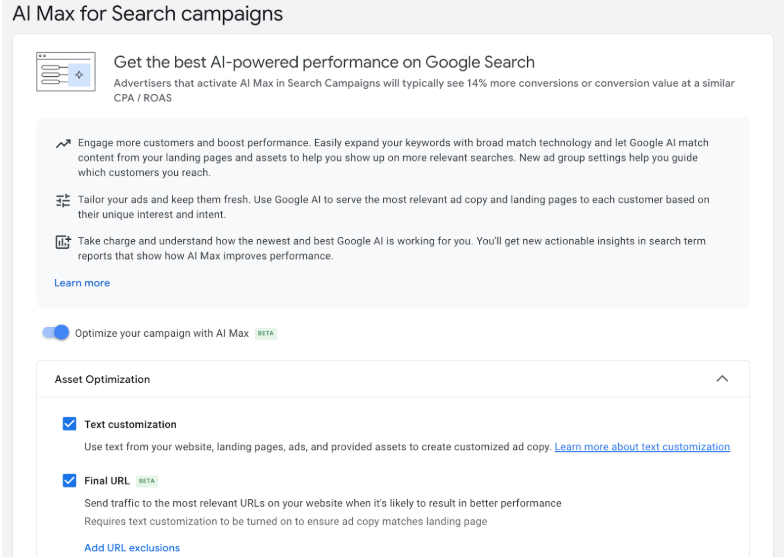
3. AI Max for Search
AI Max for Search is a new campaign option that uses AI to enhance your Search ads. It dynamically broadens keyword targeting, automatically optimizes bids, and adapts ad copy to better match the context of each query. Together, these capabilities help your ads stay visible in a search landscape where user intent matters more than exact-match keywords.
4. Improve Landing Page Content for AI Relevance
Even though ads don’t appear inside AI Overviews, Google’s AI evaluates landing page quality and relevance.
Best practices:
- Answer questions clearly and concisely
- Use structured headings (H1, H2, H3)
- Include FAQs
- Provide expert, trustworthy content
This improves both Quality Score and alignment with AI-generated results.
5. Leverage Structured Data and Clear Messaging
Structured content helps Google’s AI understand context. Make sure your site includes:
- Clear product or service descriptions
- Schema markup where relevant
- Consistent messaging between ad copy and page content
This is especially important for Shopping ads and local campaigns.
6. Optimize Ad Copy for AI-Driven SERPs
Because AI Overviews push organic results lower, your ad copy must stand out:
- Highlight clear benefits
- Use strong calls to action
- Address the user’s problem directly
Ads that closely match the AI Overview topic tend to perform better.
Final Thoughts
Google AI Overviews are reshaping search, but they don’t replace ads – they raise the bar for relevance and quality. While you can’t place ads directly inside AI Overviews yet, you can still win visibility by optimizing for AI search intent, smart bidding, strong landing pages, and Performance Max campaigns.
Advertisers who adapt early to AI-driven search behavior will gain a strong competitive advantage as Google continues to evolve its AI search experience.
Need help adapting your Google Ads strategy for AI search? Contact Excella PPC to optimize your ads for AI Mode and Overviews and drive better results.