Google Shopping Feed Optimization: Best Practices for Shopify Stores
Google Shopping can be one of the most profitable channels for Shopify stores – but only if your product feed is optimized correctly. Many advertisers focus on bidding strategies and campaign structures while overlooking the most critical factor behind Shopping performance: Google Shopping feed optimization.
Your product feed is the foundation of Google Shopping Ads. It determines when your products appear, for which queries, and how competitive they are in the auction. In this guide, we’ll break down best practices for optimizing Google Shopping feed attributes, improving feed structure, and increasing ROAS for Shopify stores.
Why Google Shopping Feed Optimization Matters
Unlike Search Ads, Google Shopping doesn’t rely on keywords you manually select. Instead, Google uses your product feed data – titles, descriptions and other important attributes to match products to search queries.
A poorly optimized feed leads to:
- Low relevance for high-intent searches
- Higher CPCs
- Limited impression share
- Lower ROAS
On the other hand, strong Google Shopping feed optimization helps you:
- Win more relevant auctions
- Improve product visibility
- Reduce wasted spend
- Scale Shopping campaigns profitably
Core Google Shopping Feed Attributes You Must Optimize
Not all feed attributes carry the same weight. Below are the most important attributes that directly impact performance.
1. Product Title (Most Important Attribute)
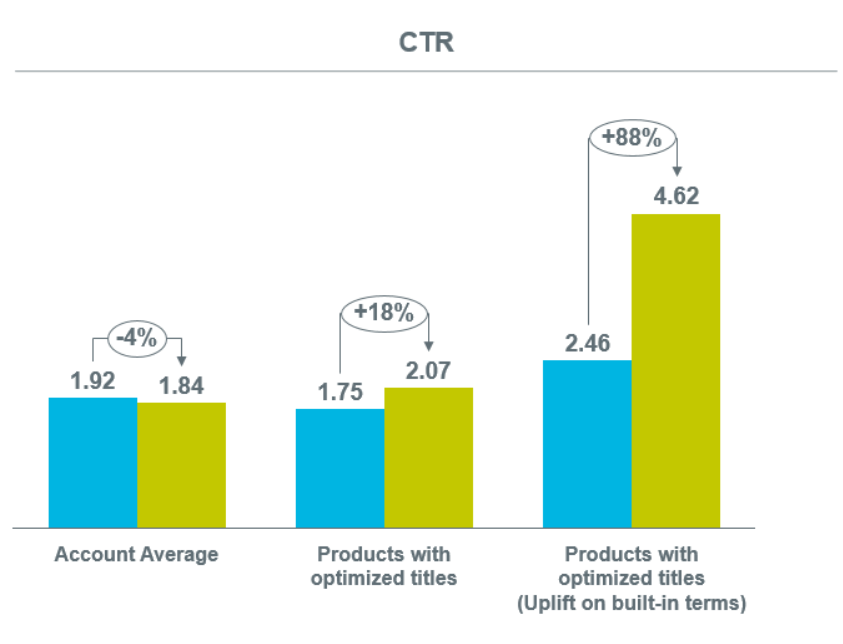
The product title is the single most influential attribute in Google Shopping. The way a product title is structured is just as important as the information it contains – the two work together. To decide which attributes to include, it’s essential to understand how Google’s algorithm selects products for search results.
Google generally gives the most weight to the words that appear at the beginning of a product title when determining relevance. That’s why the order of information in your title plays a critical role in Shopping ad performance.
- Start with the most important keyword
- Include brand, product type, size, color, or key feature where relevant
- Avoid keyword stuffing
- Follow a clear structure
Best practices for Shopify product titles:
Here are some recommended title structures that can be used as templates:
- Brand + Product Type + Color + Material
- Brand + Size (length, width, height) + Product Type + Color
- Material + Product Type + Color + Brand
- Style + Color + Product Type + Brand
- Product Type + Size + Color + Feature + Brand
Follow Google’s guidelines
Google’s requirements change over time, so it’s important to keep your product titles compliant:
- Avoid promotional phrases such as “free shipping” or “best price.”
- Keep titles under 150 characters, with the most important details visible within the first ~70.
- Don’t use ALL CAPS unless it’s part of an official brand name.
- Use clean formatting — no emojis, special characters, or unnecessary symbols.
Think from the buyer’s perspective
Your product titles should match how shoppers search:
- If customers typically search by brand, place the brand name at the beginning.
- If size, color, or material are key decision factors, highlight them early in the title.
- For seasonal products, adjust wording to reflect intent (for example, “winter coat” instead of just “coat”).
Use search query performance insights
Analyze your Google Ads Search Terms Report to find queries that drive conversions. Then optimize your product titles by incorporating those high-performing terms where relevant.
Put the most important details first
Product titles are often truncated after around 70 characters (and even earlier on mobile). Make sure your core information appears first — usually the brand, product type, and key attributes.
Example:
✔ “Adidas Ultraboost 22 Running Shoes Men’s Size 10 Black Cushioned”
❌ “Comfortable Cushioned Men’s Running Shoes Adidas Ultraboost 22”
2. Product Description (Secondary but Still Critical)
Descriptions help Google better understand your product and support query matching.
Optimization tips:
- Use natural language with relevant keywords
- Focus on benefits, not just features
- Avoid promotional text (no “free shipping” or sales language)
- Write at least 500–1,000 characters if possible
While titles drive most impressions, optimized descriptions strengthen feed relevance and improve performance over time.
3. Product Category and Product Type
These tell Google what your product is and help organize your Shopify feed in a way Google understands.
- Use the most specific Google Product Taxonomy category
- Use a clear product_type hierarchy for internal structure
- Avoid generic top-level categories
- Map Shopify collections carefully to Google taxonomy
Example:
Sports & Outdoors > Trampolines > Backyard Trampolines
Incorrect or broad categories reduce relevance and limit exposure in competitive auctions.
4. Brand, GTIN, and Identifiers
Google prioritizes products with complete identifiers.
Best practices:
- Always include brand
- Add GTINs where available
- Use MPN if GTIN is missing
- Never fake identifiers
Let’s focus on the main advantage: appearing in searches when shoppers are actively looking for the exact product you sell, as well as when they’re searching for the best options within a specific product category.
Google uses the GTIN to match your product with the supplier’s official catalog and include your listing in an auction alongside other retailers selling the same item. In these cases, Google prioritizes the standardized product data from the supplier’s catalog, which can override certain custom optimizations made in your feed.
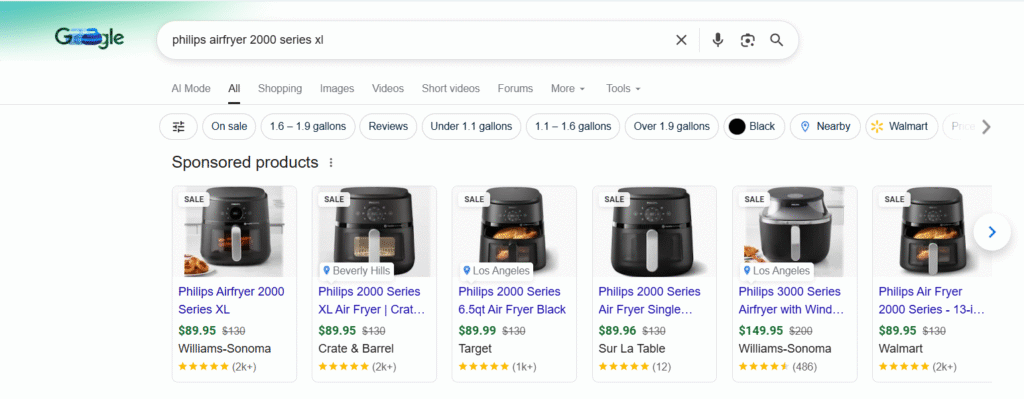
GTINs also help your products appear in high-intent searches such as “best” or “top” product queries. For these searches, Google factors in customer reviews to determine ad positioning. The stronger and more numerous your reviews, the better your chances of ranking in top positions.
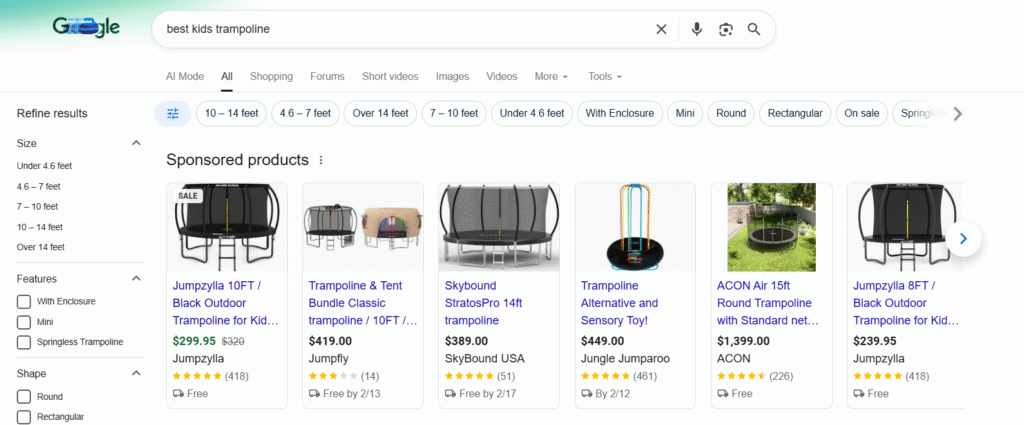
(Note: Google uses third-party review platforms such as Trustpilot, Yotpo, Verified Reviews, and others.)
Missing or incorrect identifiers can reduce impressions and eligibility for certain placements.
Advanced Attributes That Improve ROAS
5. Custom Labels (Critical for Profitability)
Custom labels don’t affect eligibility, but they are essential for ROAS-driven optimization.
Recommended custom label strategies:
- Margin tiers (high / medium / low)
- Price buckets
- Bestsellers vs low performers
- Seasonal products
Custom labels allow you to:
- Control bids by profitability
- Separate high-margin products
- Scale winners without overspending
This is a key tactic in professional Google Shopping feed management.
6. Images (Often Overlooked)
Your main product image impacts CTR more than most advertisers realize.
Image optimization tips:
- Use clean, high-resolution images
- White or neutral backgrounds work best
- Avoid text overlays or watermarks
- Show the product clearly, not lifestyle clutter
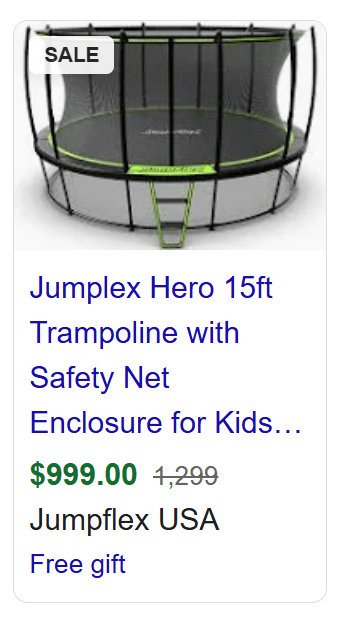
Better CTR improves Quality Signals and can indirectly reduce CPCs.
7. Price & Availability Accuracy
Price mismatches and availability errors lead to disapprovals and lost traffic.
Best practices:
- Sync Shopify prices with Merchant Center
- Avoid frequent price changes
- Ensure sale prices are configured correctly
- Keep availability updated in real time
Feed consistency is a hidden but crucial part of Google Shopping feed optimization.
Feed Structure for Shopify Stores
Use One Feed, Not Multiple Messy Feeds
Most Shopify stores perform best with:
- One primary feed
- Clean attribute structure
- Supplemental feeds only when necessary
Avoid duplicating products across feeds unless there’s a strategic reason.
Feed Structure for Shopify Stores
Use One Feed, Not Multiple Messy Feeds
Most Shopify stores perform best with:
- One primary feed
- Clean attribute structure
- Supplemental feeds only when necessary
Avoid duplicating products across feeds unless there’s a strategic reason.
Optimize at the Feed Level, Not Campaign Level
A common mistake is trying to “fix” Shopping performance only through campaigns.
High-performing google shopping ads for Shopify start with:
- Strong feed data
- Clear product hierarchy
- Consistent naming conventions
Campaigns amplify feed quality – they don’t replace it.
Feed Optimization vs Bidding: What Matters More?
Bidding strategies matter, but:
A poor feed cannot be fixed with smart bidding.
Before scaling spend:
- Optimize titles
- Improve categories and product types
- Add custom labels
- Clean up disapprovals
Only then should you push budgets aggressively.
Common Google Shopping Feed Mistakes (and How to Avoid Them)
- Using Shopify default titles without optimization
- Stuffing keywords unnaturally
- Ignoring product_type
- No custom labels
- Relying only on automation
- Not reviewing search terms via feed signals
Avoiding these mistakes alone can significantly improve ROAS.
Ongoing Google Shopping Feed Management
Google Shopping feed optimization is not a one-time task.
Ongoing tasks include:
- Reviewing search query performance
- Updating titles based on real data
- Refining categories
- Adding new custom labels
- Removing underperforming variants
Consistent feed management is what separates average accounts from highly profitable ones.
Top Shopify Apps for Google Shopping Feed Optimization
To improve feed quality and save time, many Shopify stores use feed management tools. These apps help automate data transformation, fix common errors, and sync to Google Merchant Center.
Here are some of the best Shopify apps for feed optimization:
MultiFeeds
A flexible and powerful feed builder:
- Create multiple versions of feeds for different channels
- Map attributes and apply custom rules
- Automate title and description optimization
- Sync optimized feeds directly to Merchant Center
Great for stores that need advanced segmentation and multiple channel feeds.
Channable
A top-tier feed and marketplace automation platform:
- Build and optimize Google Shopping feeds with rule-based logic
- Automate product categorization and attribute enrichment
- Export to multiple channels (Shopping, marketplaces, comparison sites)
- Support for custom labels, dynamic rules, and tracking
Excellent for merchants with complex catalogs and multi-channel strategies.
ShoppingFeeder
Highly rated feed management tool:
- Advanced feed optimization across multiple channels
- Custom label automation and category mapping
- Performance insights for feed enhancements
- Supports international feeds and dynamic rules
Ideal for mid-to-large catalogs and businesses scaling beyond basic feeds.
FeedFix
A highly flexible platform for managing complex product data feeds:
- Import and export XML/CSV feeds from multiple data sources
- Create fully customized Google Shopping feeds with advanced mapping
- Enrich product data from external sources
- Designed for large or complex catalogs with multiple variants
- Supports integrations with additional marketplaces and channels
Best suited for merchants with technical requirements, multi-source catalogs, or the need for deep feed customization.
Google Shopping Feed by Simprosys
Popular Shopify app with strong optimization features:
- Generates optimized Google Shopping feeds
- Handles variant mapping and product images
- Supports dynamic attributes and tagging
- Easy integration with Merchant Center
Perfect for stores that want quick setup + reliable optimization.
DataFeedWatch
Flexible and customizable feed tool:
- Advanced rule-based feed transformations
- Multi-channel feed compatibility
- Easy mapping interface and segmentation
- Supports Google, Amazon, Bing, and more
Great for merchants advertising on multiple paid channels.
FeedHub: Google Shopping Feed
A robust solution for advanced Google Shopping feed management:
- Deep customization of attributes using rules and templates
- Product segmentation by collections, categories, and tags
- Automated optimization of titles and descriptions
- Support for custom labels to improve bidding and campaign structure
- Built-in error diagnostics and Merchant Center monitoring
Perfect for Shopify stores that want full control over feed quality and performance to maximize ROAS.
Flexify
Syncs product data to both Facebook and Google
- Category mapping and automatic feed updates
- Helpful for consoliated feed management
Useful if you run both Facebook and Google Shopping ads.
Wixpa Google Shopping Feed
A flexible tool for creating and managing optimized Google Shopping feeds:
- Automatic feed creation and real-time updates from Shopify
- Advanced attribute customization and rule-based optimization
- Support for multiple feeds by country and currency
- Bulk editing capabilities for large product catalogs
- Seamless integration with Google Merchant Center and Google Ads
Ideal for merchants looking for a balance between ease of use and powerful feed optimization features.
Nabu for Google Shopping Feed
A simple and reliable app for connecting Shopify to Google Merchant Center:
- Automatically generates and syncs your Google Shopping feed
- Easy customization of key attributes: titles, descriptions, product types, and custom labels
- Support for multiple countries and languages
- Built-in compliance with Google Merchant Center requirements
- Clean, user-friendly interface with minimal setup
Great for small and mid-sized Shopify stores that need a fast, stable way to launch and manage Google Shopping campaigns.n.
What These Apps Help You Achieve
Using one of these Shopify feed tools, you can:
✔ Automatically rewrite titles and descriptions
✔ Create custom labels for better bidding
✔ Map products to the correct Google Product Taxonomy
✔ Enhance data accuracy before Merchant Center upload
✔ Fix errors and warnings more efficiently
✔ Create multiple optimized feeds for different audience targets
These are all crucial parts of Google Shopping feed optimization and contribute directly to improved ROAS.
Choosing the Right App
Here’s a quick suggestion based on your store needs:
| Business Need | Recommended Apps |
|---|---|
| Simple setup, small stores, basic optimization | Nabu, FeedHub, Simprosys, Wixpa |
| Growing stores needing rules & segmentation | Wixpa, FeedHub, FeedFix |
| Advanced optimization & multi-country | DataFeedWatch, Channable |
| Enterprise / multi-channel automation | Channable, DataFeedWatch |
| Technical / custom XML needs | FeedFix, MultiFeeds |
The right app depends less on the number of products and more on the complexity of your markets, need for custom rules, and how much control you require over Google Shopping feed optimization.
Final Thoughts: Feed Optimization Is the Growth Lever
For Shopify stores, Google Shopping feed optimization is one of the highest-ROI activities you can invest in. It directly impacts visibility, CPCs, conversion rates, and overall scalability.
If your Shopping campaigns feel capped or inefficient, the issue is rarely bidding alone — it’s almost always the feed.
Need Help With Google Shopping Feed Optimization?
At Excella PPC, we specialize in Google Shopping feed optimization and high-performing Google Shopping ads for Shopify stores.
If you want to improve ROAS, clean up your feed, and scale profitably, feel free to contact us – we’ll be happy to help.